Tuesday, July 10, 2012

Download Piccap For Android Free

Piccap For AndroidDo you use android for your smartphone ?? if you use it you can download this app for your gadget this app named Piccap and you can download it at google play.


Android is operating system allows a large number of various customization’s and this is one of the reasons why it is so popular. Many developers have delivered small application that brings changes and improvements to your device. One of apps that can be very funny and interesting to use is Piccap that delivers tools to your Android powered cell phone or tablet device which can be used to customize your images after which you can share them with your friends.
Main menu of this application allows you to either import an image that you have already taken or to take a new one and then edit it. When you add image Piccap will create random caption and if you like it you can save image and later share it with your friends.


There are many different captions and all are very funny, many times you will get party quotes that will certainly make you laugh. Also have in mind that some comments and captions that this program adds can be rude and someone might get its feelings hurt.
Current version of Piccap For Android is 1.3 and it weights only 911 KB so you will be able to add it to almost all devices without any problems. Miko Lee is the developer and since it has more than a 100 000 downloads we can say that it is very successful and widely used.
There are few problem with this software but it all can be easily removed with next few versions. For example it would be great if we could deliver the image directly to Facebook after we are finish playing with it. Also, there is no way you can rotate image or text, this would be great addition to already nice application.

AVG Free Edition 2012 12.0

AVG Free Edition 2012Do you use AVG for your computer security ?? if you don't have you can use AVG free edition 2012 12.0 you can download it for free.


Most important piece of software on every computer is antivirus program that you need to choose carefully so you would get the best possible protection. AVG Free Edition is certainly one of the best you can choose and what is important for large number of users it is free. There are reports that say that free antivirus programs do not provide the best protection but that is not always truth since there are many high quality free antivirus solution.


For most users AVG Free Edition will be a sufficient protection so we recommend this antivirus for everyone. Only problem that you might have is if you are hardcore downloader and you are getting large number of files from the Internet and some suspicious locations. But if you are downloading from reliable sources there will be no problems.
Interface of AVG Free Edition is simple, clean an pleasant so you will have everything close and ease to access. There are large numbers of features that you would expect to see in paid solutions only but this free version also brings features like LinkScanner, Anti-Rootkit, E-mail Protection, etc.
The scanning process is really fast and thanks to Smart Scanning it can even allow users to work on the computer without noticeably affecting performance. Basically, this particular function starts a scanning process when the computer is idle and switches to a low-priority mode once it detects some activity.
With integrated PC Analyzer you will be able to scan your PC and find any problems with registries, junk files, errors that were made during fragmentation and similar problems. If you solve these problems you will have faster and more reliable system.
To sum it up, users can stop searching for an efficient antivirus solution, and give AVG Free Edition a try. It might prove to be ideal for those who cant afford to invest in security software yet want to be sure their PC can detect and block malware threats.
When you start installation you will need to pay attention since AVG Free Edition will offer you to change settings that are related to a search engine in your browser. If you decide not to allow these changes this software will work properly and with all functionality.

Download WinISO 6.2.0.4574

WinISO 6.2.0.4574
Good night my friends, now I want to inform tou about software update, and this software named WinISO 6.2.0.4574
If you ever wanted to create ISO (image files) backup file of your CD/DVD’s or folders thanĂ‚ WinISO is an device that you might want to include to your list. Simple to use interface in this application allows both newbies and more experienced users to easily get the wanted results. Finally it is easy to create image disks and burn them on another CD/DVD or save them on your HDD for latter use.
WinISO can be downloaded from digzip for free.
Most common formats are supported and you will be able to create files in ISO, BIN, NRG and CUE formats. Also you can now clone any CD or DVD that you have in your collection. This is powerful tool with great features and you will be able to change allot of various setting to get it in order to best suit your needs.
If you want to create new image file you will need just to select desired file system and that is it. You can choose between HFS, ISO9660 or UDF. After you are finished with that just simply add file that you want to process and withĂ‚ WinISO you will be able to rename it and organize everything about it.
One advantage is that the program works pretty fast, as creating the image file usually takes just a few minutes. For example, archiving a 350 MB folder into an ISO file takes less than a minute.
Among other features WinISO will allow you to create bootable disk images with only few clicks. Also you will be able to extract content of a disk image and burn it to CD/DVD or mount it to a drive. Since this software product brings integrated built in conversion utility you will be able to convert file into different format.
Overall, WinISO is an efficient solution for converting image files, creating bootable CD / DVD image files and disk image extraction, creation and editing.

Best Android Apps in the World

in this post i want to inform you the best android apps based on my opinion, how with you ??


Flashlight HD LED iconFlashlight HD LED (Free)


There are a lot of flashlight apps, and some phones come with them, but if you’re in need, we like the Flashlight HD the best. It can use your phone’s camera flash as a light, but also gives you complete control over the screen. You can choose from thousands of colors, turning your phone’s front screen into whatever color you’d like. That’s mostly all it does, but it does it well. When you need a flashlight, you need a flashlight. This does the job. Did we mention it has an on/off widget? Very handy.


Flashlight HD LED Android screenshots

HopStop-iconHopStop (Free)

Those of you who don’t live in a city, this won’t be an app for you, but those of you in New York City or other cities full of complicated subway and bus routes, HopStop is one of our favorite services. The Android app (m.hopstop.com works as well), but it’s the most accurate subway and bus navigation system we’ve used. You do have to know the address of your location, but HopStop does a good job guiding you to more generic locations like an intersection, which some services struggle with. It also maps out how long it will take you to walk around, features a lot of flexible options to modify your route, and lets you save routes for the future and view them offline, which is helpful if you’re underground. Give it a try. (The tablet version is coming soon.)


HopStop-android-apps

weather-channelWeather Channel (Free)

This is the weather app you’ll find yourself checking before you even crack the blinds in the morning. Besides offering accurate current conditions with extreme detail down to wind speed, humidity and UV index, the Weather Channel’s app offers hourly and 10-day forecasts for planning ahead, plus advanced features like animated weather radar.


weather-channel

Widgetsoid-iconWidgetsoid (Free)

Widgetsoid allows you to create your own widgets for various phone functions. You can create a widget that will allow you to toggle your 4G antenna on and off, or create your own clock widget that can display whatever phone information you want, from battery charge to phone temperature. It’s pretty useful. There is a free and a paid version, which has some added functionality.


Widgetsoid-screenshots-android

iTriage Mobile HealthiTriage Mobile Health (Free)

Created by doctors, this app is designed to give users quick and easy access to medical info as well as nearby treatment facilities. With just a few clicks, users can find the nearest medical facility based on need (emergency, urgent care, pharmacy, etc.) and quickly use built-in Google Maps to navigate to the destination. The app also features a symptom-checker, doctor directory, and information about diseases and procedures.


iTriage Mobile Health

Chrome-Beta-iconChrome Beta (Free)

The default Android Web browser is fine, but if you’re on an Android 4.0 phone (or tablet), you can now download a fully operational version of Google Chrome. Simply put, it’s the best mobile browser we’ve used, with robust tab management, private browsing, and the ability to sync your tabs from your browser with your phone.
Chrome-Beta-android

Pulse-iconPulse News (Free)

This free app is a great reader for those who like to get their daily dose of news or gossip on their Android device. Pulse lets users select up to 30 online sources to pull from, and then creates clean, magazine-like pages that feature thumbnail photos and headlines from each source. Most articles or blogs can be easily read within the app, and the sources update in a flash. It’s the perfect substitute for your morning or evening Internet scan. Add sources like CNN, Gawker, Salon, Wet Paint, MSNBC, and Mashable.


Pulse-android

IMO-Chat-iconIMO Chat (Free)

If you like to use your Android phone to chat with friends using instant messaging applications instead of simple text messages, you most likely find yourself shuffling between Facebook, GTalk, and AIM, or some similar combination of apps. While most of those individual apps for Android are great themselves, IMO Chat eliminates the hassle of carrying on multiple conversations on different IM apps. IM on Facebook, GTalk, MSN, AIM, Yahoo, Jabber, Skype, and more with this app. The IMO Chat app also supports voice IMs, group chat, and multimedia attachments.


IMO-Chat

How about you ??

Google Nexus 7 Spesification, Release Date News and Feature

Google Nexus 7 release date, news and featuresGoogle Nexus 7 processor

Inside the Google Nexus 7 is a quad-core Tegra 3 processor packing a 12-core GPU and 1GB of on-board RAM. This, combined with some clever under-the-hood streamlining, means a buttery-smooth performance (pun intended, see below).
What does this mean in real terms? Google was at pains to stress the AWESOME GAMING POWER of a 12-core GPU. The built-in HDMI means you'll be able to connect it to your telly too

The Nexus 7 operating system is Android Jelly Bean

As you'd expect, Google's tablet runs Google's latest operating system:Android 4.1, aka Jelly Bean. It also benefits from the very polished "Project Butter" user interface technology, which is much smoother than previous Androids or Amazon's forked version of the OS, and it's the first Android tablet to ship with Chrome as its default browser.
There's also a big camera improvement, a whole host of browser tweaks and some clever voice recognition upgrades... in short, a lot of worthwhile reasons to check out the first Android Jelly Bean device.

Google Nexus 7 dimensions and specs

The Nexus 7 is 198.5 x 120 x 10.45mm. It's considerably lighter than an iPad, and lighter even than a Kindle Fire: at just 340g, the Nexus 7 is the weight of a fairly slim book.
The Nexus 7 display is a seven-inch, 1280x800 IPS display, and you can choose between 8GB and 16GB versions.
There's integrated Wi-Fi but no 3G or 4G, a front-facing camera and a 4,325mAh battery that Google says is good for 8 hours of "active use".
There's also no microSD card slot, so you're limited massively if you're one of those that loves HD movies.
The Nexus 7 tablet includes a microphone, Bluetooth, NFC for Android Beam, an accelerometer, magnetometer, GPS and gyroscope, and the built-in Wi-Fi supports 802.11b, g and n.

Google Nexus 7: media marvel

While the Nexus 7 does apps, of course, the whole thrust of Google's keynote was media consumption: look at the books! Look at the games! Look at the videos! That's the marketing message here and it's clear that this is a massive weapon in Google's attempt to topple the Kindle Fire.
And of course, no keynote is complete without a sly dig at Google's biggest competitor at the moment:
"With the Music Manager, you can easily import your entire iTunes music library* into Google Play", Google says. That asterisk means that it doesn't do DRM, and you're limited to 20,000 songs.

Google Nexus 7 release date and price

For once, we don't have to wait forever to get our hands on some exciting new tech: the Nexus 7 launches in the US, UK and Australia this July. That's, like, days away!
The UK price for the Nexus 7 will be £159 for the 8GB model, and the 16GB one will cost £199. That gives you not just the tablet but £15 of Google Play credit to spend too, and it means that even the priciest model is half an iPad.
Google will also offer a soft cover (but not a Surface-style keyboard one, at least not just now) and an extra charger should you need one.

i very interest with this gadget, how with you ?? i hope you also interest with this gadget . . .

Monday, July 9, 2012

9 July Internet Will die, it's Really ??

Do you already know the news about the internet apocalypse tomorrow? Internet doomsday threats stayed 1 day longer. Precisely July 9, 2012, approximately 500 thousand infected hardware can die because of attacks of malware DNS. DNS or Domain Name System is an Internet service that converts domain names like www.google.com into the text, so that between the computers can communicate with each other.

However, a number of cyber criminals have been infected with malware called DNSChanger. This virus could allow cybercriminals control the DNS server. As a result, the world of cyber thief could disrupt Internet access and computer owners harmful interactions between computers that have been infected. Google predicts about 500 thousand more computers already infected with DNSChanger Trojan.

There are ways to check the spread of these attacks. First open the site "www.dns-ok.us". This page will indicate if a computer is infected with malware. If it says DNS Resolution = Green, the computer is safe. But if the DNS Resolution red, caution is an early indicator of infection.

Not only www.dns-ok.us site, Google also made ​​an application that warned of this threat. The search engine giant will display a warning for the indicated taxable computer malware if open google.com. In the warning, Google has also added a link to remove malware attacks.

In March 2012, the FBI has obtained permission from the court to allow clean up their own DNS server. This solution is temporary because it allows the victims to clear their DNS settings and return to normal DNS. But only until July 9, 2012, computers still remain infected with DNSChanger will receive Internet apocalypse.


yeahh . . .my computer still run well and not infected, god bless us hehe

Apple iPhone 4S Complete Review

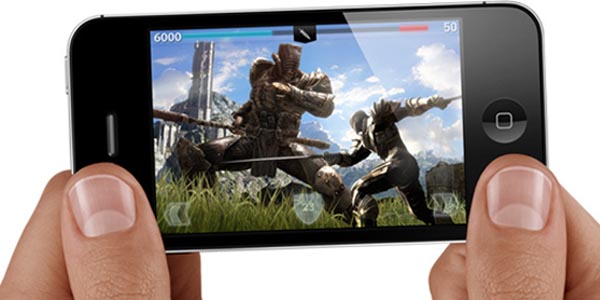
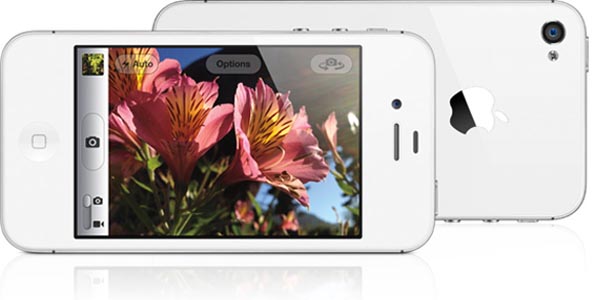
Well-known and so far new, the iPhone 4S may not appear different from the exterior, but within it’s an extremely different being. Apple presenting its 5th-gen smartphone wants to take us to the next dimension of smartphones with their devil the -iPhone 4S- which is amazingly fast, very-well armed with specifications and hence other rivals beware! But iPhone 4S does really has the guts to be your all-in-one smartphone? We’re about to see in our iPhone 4S review below:
Pros
  • Amazing shooter
  • Smart & elegant design
  • Remarkable display quality
  • Snappy processor
  • Hosts a lot of new apps
Cons
  • Siri is restricted to UK only (for now)
  • Identical to the preceding iPhone 4 in terms of design

iPhone 4S Specifications

General

2G Network        GSM 850 / 900 / 1800 / 1900
3G Network        HSDPA 850 / 900 / 1900 / 2100 -CDMA2000 1xEV-DO
Announced        2011, October
Status             Available. Released 2011, October

Size

Dimensions        115.2 x 58.6 x 9.3 mm
Weight        140 g

Display

Type        LED-backlit IPS TFT, capacitive touchscreen, 16M colors
Size        640 x 960 pixels, 3.5 inches (~330 ppi pixel density)
  • Scratch-resistant oleophobic surface
  • Multi-touch input method
  • Accelerometer sensor for auto-rotate
  • Three-axis gyro sensor
  • Proximity sensor for auto turn-off

SOUND

Alert types        Vibration, MP3 ringtones
Loudspeaker        Yes
3.5mm jack        Yes

MEMORY

Phonebook        Virtually limitless entries and fields, Photocall
Call records        100 received, dialed and missed calls
Built-in        16/32/64 GB capacity, 512 MB RAM
Card slot        No

DATA

GPRS        Yes
EDGE        Yes
3G        HSDPA, 14.4 Mbps; HSUPA, 5.8 Mbps
WLAN    Wi-Fi 802.11 b/g/n, Wi-Fi hotspot
Bluetooth    Yes, v4.0 with A2DP
Infrared port    No
USB        Yes, v2.0

CAMERA

Primary    8 MP, 3264×2448 pixels, autofocus, LED flash,
Features    Touch focus, geo-tagging, face detection
Video        1080p@30fps, LED video light, video stabilization, geo-tagging
Secondary    VGA

FEATURES

OS    iOS 5
Processor    1 GHz dual-core ARM Cortex-A9 processor, PowerVR SGX543MP2 GPU, Apple A5 chipset
Messaging    iMessage, SMS (threaded view), MMS, Email, Push Email
Browser    HTML (Safari)
Radio        No
Games    Downloadable, incl. motion-based
Colors    Black, White
GPS    Yes, with A-GPS support and GLONASS
Java    No
  • Micro SIM card support only
  • Scratch-resistant glass back panel
  • Active noise cancellation with dedicated mic
  • Siri natural language commands and dictation
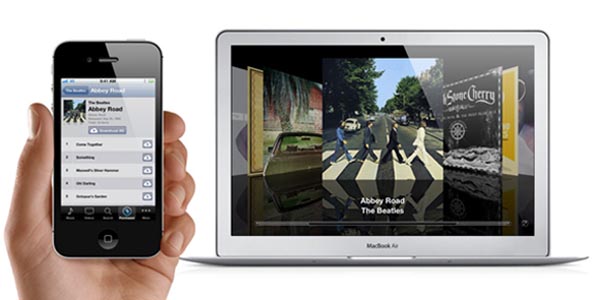
  • iCloud cloud service
  • Twitter integration
  • Digital compass
  • Google Maps
  • Audio/video player and editor
  • Image editor
  • Voice command/dial
  • TV-out

BATTERY

Type        Regular battery, Li-Po 1432 mAh
Stand-by    Up to 200 h (2G) / Up to 200 h (3G)
Talk time    Up to 14 h (2G) / Up to 8 h (3G)
Music play    Up to 40 hours

iPhone 4S Design

If you ever held an iPhone 4 in your hand, you will feel the same experience when holding the iPhone 4S, for the reason that it bears almost the same design. This was not a point of complaining since the same iPhone 4 look is gorgeous and admired in present days too!

iPhone 4S Operating System

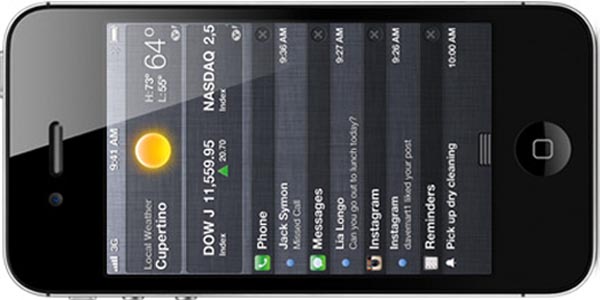
The iPhone 4S is operated by iOS 5, which is the latest edition of Apple’s mobile software. In iOS 5 you get the same basic feel but with added features and aspects.

iPhone 4S Processor

The iPhone 4S features a bigger processor to the iPhone 4 in the form of the A5 chip. And it sure feels really efficient, with applications being launching instantly, navigation and speedy typing giving instant response to every single tap.

iPhone 4S Camera

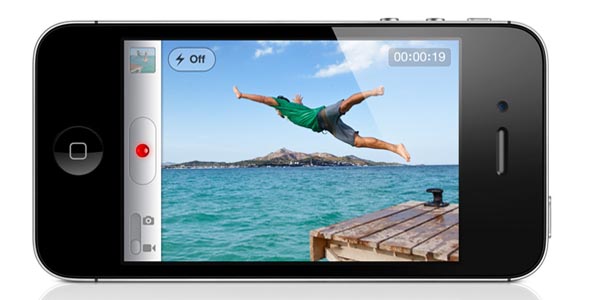
The iPhone 4S equips a new 8 MP shooter which has optic tech, as well as face-detection feature, rear illumination (titter) and a new sensor. As far as image quality is concerned, we were pleased with the iPhone 4S’s camera, the captured image gave more natural feel than iPhone 4.
While, the camera of the iPhone 4S provides excellent depth of field. In addition, the 1080p video recording is also very crispy and punchy!

Conclusion

The iPhone 4S is no doubt still leading the smartphone war, but the distance has lessened considerably, with Android and even Windows Phone mobiles becoming gradually more handy and elegant. Reviewing the whole mobile industry from different angles, we’re not sure if the iPhone 4S helps to maintain the leadership of for another whole year or not. But we sure can say that iPhone 4S is the best smartphone to date